Page 1 of 2
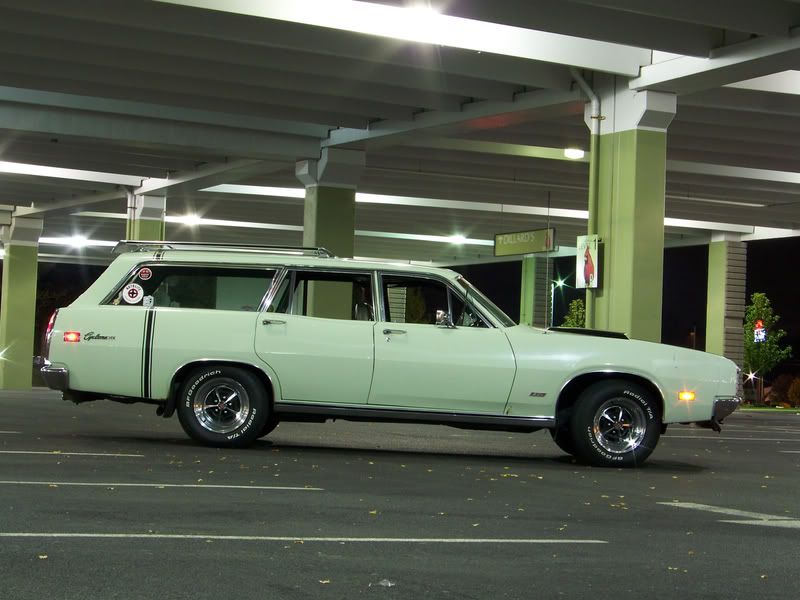
Its been a while. Fairlane pics/and a guest
Posted: September 20, 2008, 10:50 pm
by Phil
Posted: September 20, 2008, 10:57 pm
by Greg D
That's a cool wagon - nice pics!
Posted: September 21, 2008, 2:35 am
by Alan Mclennan

Nice pic`s Phil!, 351 Clevo mmmmmmmmmmm Nice!
Alan,
Posted: September 21, 2008, 11:06 am
by Hoofbeat Racer
Looks great Phil. ALways look forward to seeing your pics. There must be a lot of old brick buildings in Toledo. My wife loves taking pictures by them too. THey really turn out cool.
BTW, how do you keep the paint from fading on the Torino due to the constant bombardment of you camera flash?

Posted: September 21, 2008, 9:07 pm
by td
HeavyHauler,
the 7th one down of the torino by its self is a killer pic man!!!
i love your car!
Posted: September 21, 2008, 11:27 pm
by Phil
Posted: September 22, 2008, 12:10 am
by Hoofbeat Racer
Phil, I don't know what you use to edit your pics. They look awesome. If you want to really have some fun, try playing with Adobe Lightroom. There have a free 30 day download trial. I have some killer presets that I could send you. We use it for our photo business. BTW, my wife loves the bricks.
Posted: September 22, 2008, 3:08 pm
by jwh f-100
Great pics Heavy
I need to get my camer figure out. I takes great pics but they are huge. I have to resize them down to 25% and then they look like poop.
I suppose there could be an adustable setting for that on the camera but not sure where to start. I like to change the size of the pics but keep the high quality... Any suggestion/pointers ????
Posted: September 22, 2008, 5:27 pm
by Slick Fan
What kind of camera do you have, Jason? My HP camera has three settings, and displays a star on the top display next to the remaining picture number.
Hit the "mode" button to adjust the pic sizes.
I wish I had a good photographic eye, like Phil does. Here's a couple I took a while ago of the Stinkin' Lincoln. A storm had just rolled through & the clouds were lingering above the hilltop behind, with a little sun poking through.
I thought it looked like a prime time for a "Phil" attempt.


Posted: September 23, 2008, 12:36 pm
by Phil
That car is sa-weet
Need to lose that tree though

Posted: September 23, 2008, 12:37 pm
by Phil
jwh f-100 wrote:Great pics Heavy
I need to get my camer figure out. I takes great pics but they are huge. I have to resize them down to 25% and then they look like poop.
I suppose there could be an adustable setting for that on the camera but not sure where to start. I like to change the size of the pics but keep the high quality... Any suggestion/pointers ????
I resize everything in Photoshop. Not sure how to do it in-camera
Posted: September 23, 2008, 1:09 pm
by Greg D
In the menu for my Olympus there are 4 settings for picture size. Also effects the number of pics (total memory).
Posted: September 23, 2008, 2:12 pm
by Slick Fan
Greg D wrote:In the menu for my Olympus there are 4 settings for picture size. Also effects the number of pics (total memory).
Yep, mine too. The larger the pics, the fewer pics the memory will hold.
HH, you didn't like the tree growing through the roof?

Posted: September 23, 2008, 2:36 pm
by Johnny Canuck
Slick Fan wrote:
I wish I had a good photographic eye, like Phil does. Here's a couple I took a while ago of the Stinkin' Lincoln. A storm had just rolled through & the clouds were lingering above the hilltop behind, with a little sun poking through.
I thought it looked like a prime time for a "Phil" attempt.
Slick Part of the problem is explained in this pic

Posted: September 23, 2008, 2:37 pm
by Phil
Slick Fan wrote:HH, you didn't like the tree growing through the roof?
Beats this pic of my buddy's XR4ti

Posted: September 23, 2008, 7:53 pm
by ezernut9mm
great pics man! cars look killer.
Posted: September 24, 2008, 9:59 am
by jwh f-100
Thanks Guys,
I got it fixed. I have a HP Photosmart M425. It has 5 settings, 5MP best, Normal (5MP), 3MP, 1MP, and VGA. It was set on Normal (5MP) so I bumped it down to 1MP and will have to see how that works for me.
Posted: September 24, 2008, 11:04 am
by Slick Fan
Johnny Canuck wrote:
Slick Part of the problem is explained in this pic.
I see you've been talking with my Wife.

Posted: September 24, 2008, 12:03 pm
by Johnny Canuck
Of the many kind things I could say of those vintage Lincolns, "they are beautiful" wouldn't be one of them
OTOH, those are by far the best looking of the Torinos from '70-72
Posted: October 9, 2008, 9:27 pm
by Phil